The Best Mind Mapping Apps for Android That Actually Help You Think
Your brain doesn’t work in bullet points. Mind mapping gets closer to how ideas actually connect, and if you’ve ever tried to plan a project, study for an exam, or untangle a complex problem on your phone, you know how much the right app matters. I’ve tested each of these on a Pixel 10 and a Samsung Galaxy Tab S9, looking at how they handle real workflows rather than demo maps with five nodes.
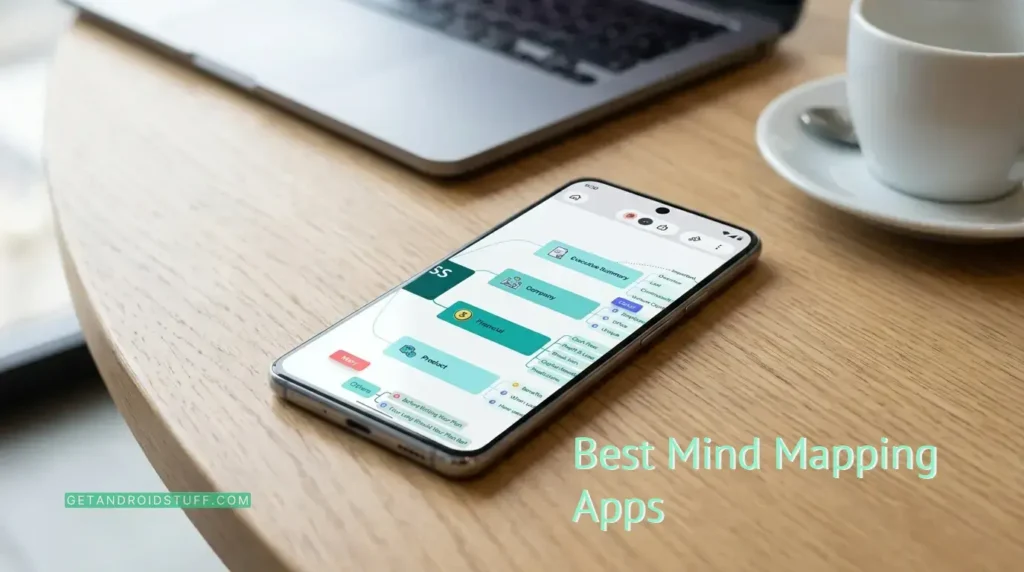
The best mind mapping apps on this list were selected based on Play Store ratings, review volume, feature depth relative to price, and how they actually behave with permissions and offline use. Some are free with zero catches. Others want a subscription. I’ll tell you which ones are worth it.
Xmind
SimpleMind Lite
SimpleMind Pro
Mindomo
miMind
Nice Mind Map
AYOA
EdrawMind
GitMind
Lucidchart
What to Look For in a Mind Mapping App
Not every mind map app suits every use case. Here’s what actually matters when choosing one.
- Layout variety: A single radial layout works for casual brainstorming, but students and professionals often need org charts, fishbone diagrams, or timelines. Apps with five or more structures handle a wider range of tasks without forcing you to switch apps.
- Offline capability: If you’re studying on a commute or planning in a meeting room with unreliable Wi-Fi, offline access is non-negotiable. Several apps on this list silently require a connection to do anything useful.
- Export formats: PNG and PDF are the baseline. If you need to share with someone using a different app, OPML and Markdown exports are far more useful than a screenshot. Check what the free tier actually exports before committing.
- Account requirements: Some apps let you start mapping immediately. Others won’t let you create a single node without signing up. For privacy-conscious users or quick one-off tasks, no-account apps are a meaningful advantage.
- Sync and cross-platform access: If you switch between your phone, tablet, and a Windows or Mac desktop, you need sync that actually works across all three. Dropbox-based sync is reliable; proprietary cloud sync varies.
App Reviews
SimpleMind Lite: Best Free Mind Mapping App with No Account Needed

Pros
- No account required, no ads, and no subscription pressure
- Free-form layout lets you place topics anywhere on the canvas
Cons
- No cross-device sync in the free version
- Export options are limited compared to the paid Pro version
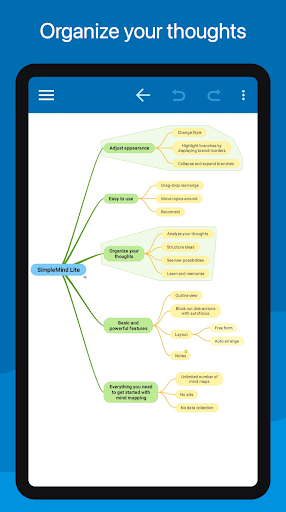
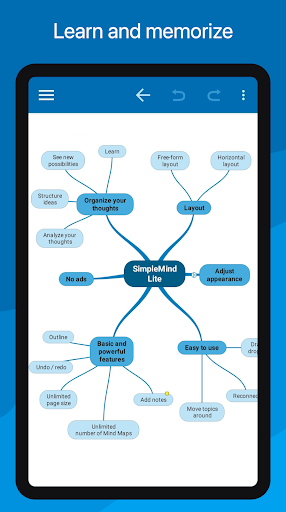
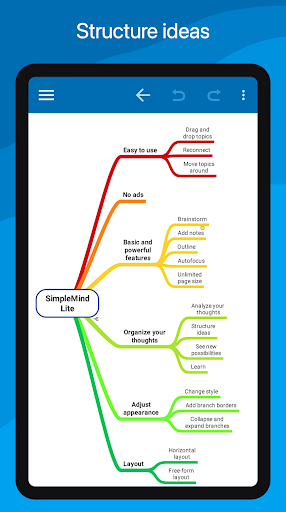
SimpleMind Lite is the rare free app that doesn’t make you pay with your attention or your data. No ads. No sign-up screen on first launch. You open it and start mapping. That alone puts it ahead of half this list for users who just want to get ideas down fast.
The free-form canvas is the standout feature. Unlike most mind mapping apps that lock you into a tree structure, SimpleMind Lite lets you drop topics anywhere on the page, which suits visual thinkers who don’t want their layout dictated by an algorithm. Auto-layout modes are also available if you prefer structure.
Where it falls short against SimpleMind Pro is obvious: no Dropbox sync, no voice memos, no slideshow mode. The export situation in the free tier is thin. If you work across multiple devices, you’ll hit that wall quickly.
For students or anyone who wants a private, offline-first mind mapping experience without handing over an email address, SimpleMind Lite is the best starting point on this list. Upgrade to Pro when you need more.
SimpleMind Pro: Best Cross-Platform Mind Mapping App for Power Users



Pros
- Dropbox sync works reliably across Android, Windows, and Mac
- Voice memo support lets you record ideas directly onto map nodes
Cons
- Desktop version is a separate purchase on top of the Android app
- No AI features, which newer apps on this list include at lower price points
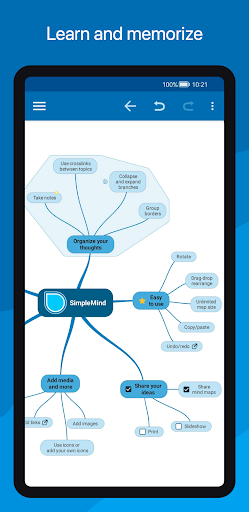
SimpleMind Pro is the paid version of SimpleMind Lite done right. The one-time purchase model is increasingly rare in this space, and if you’ve grown tired of monthly subscriptions eating into your budget, that alone makes it worth considering.
The Dropbox sync is the real selling point. It works across Android devices and the desktop app on Windows and Mac, though that desktop version costs extra. Compared to Mindomo, which includes cloud sync in its base plan, the additional cost stacks up. Whether that matters depends on how deeply you use the desktop side.
The feature list is genuinely deep. You get checkboxes, progress bars, auto-numbering, crosslinks between any two topics, slideshow mode on tablets, and over 15 style sheets to customize the look. The outline view is clean and useful for converting a mind map into a document structure.
What it doesn’t have is AI. If generating a map from a prompt or summarizing a PDF into nodes sounds useful to you, look at GitMind or EdrawMind instead. SimpleMind Pro is for people who want a mature, distraction-free tool that they own.
Mindomo: Best Mind Mapping App for Real-Time Collaboration on Android

Mind Map Maker - Mindomo
Pros
- Real-time collaboration with live co-editing across devices
- AI-powered map generation from prompts or existing diagrams
Cons
- Requires an account to use any features
- Full collaboration features sit behind the paid tier
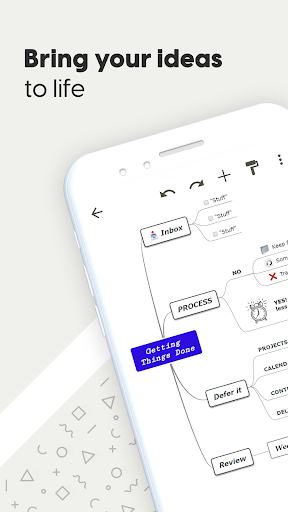
Mindomo earns its spot as the best collaborative mind mapping option on Android. Where SimpleMind Pro handles solo work brilliantly, Mindomo is built for teams. Multiple people can edit the same map in real time, which is genuinely useful for group projects and classroom settings, not just a marketing bullet point.
The app supports offline work and syncs when you reconnect, which puts it ahead of Lucidchart for users who need reliability on the go. Multiple layout types are available including circular, concept map, and org chart, giving you more structural options than SimpleMind Lite.
The AI integration lets you generate new maps from a prompt or modify existing ones, which is a meaningful time-saver during brainstorming. That said, the AI features are tied to the paid plan.
For students doing group assignments or professionals running collaborative workshops, Mindomo is the strongest pick among the collaboration-focused apps. It is more purpose-built for that use case than Xmind, which spreads its feature set wider.
miMind: Best Free Offline Mind Mapping App with No Ads

miMind - Easy Mind Mapping
Pros
- No ads and no account required, fully offline by default
- Exports to JPEG, PNG, BMP, PDF, TXT, and XML from the free version
Cons
- Cloud backup via Google Drive or Dropbox is manual, not automatic
- UI feels dated compared to Xmind or EdrawMind
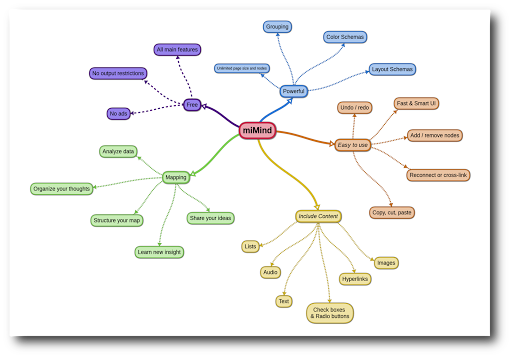
miMind makes a clean promise and keeps it. No ads. No account. No network connection required to use the core features. Among the best mind mapping apps for Android that cost nothing, this one has the most generous free export options I’ve tested. You can export a finished map to PNG, PDF, XML, or plain text without paying anything.
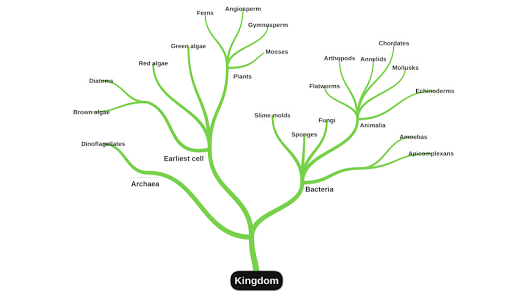
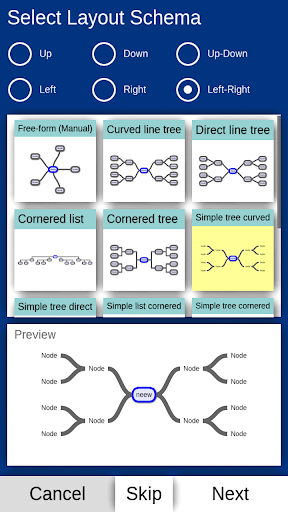
The shape library is genuinely wide: squares, hexagons, clouds, octagons, and more. The app also imports FreeMind files, which is useful if you’re migrating from a desktop workflow. Cloud backup to Google Drive and Dropbox works, but you trigger it manually rather than having it sync automatically the way SimpleMind Pro does with Dropbox.
Compared to SimpleMind Lite, miMind gives you more export formats in the free tier. Compared to Xmind, the UI feels about four years behind. The canvas interaction is functional but not polished, and the visual style won’t win awards.
If you want a capable, private, offline mind mapping app that exports in multiple formats and never asks for a credit card, miMind is a strong choice, especially for students on a budget.
Nice Mind Map: Best Mind Mapping App for Students Who Need All-in-One Tools

Nice Mind Map - Mind mapping


Pros
- Combines mind mapping, to-do lists, and a doc editor in one app
- Supports Google Drive and OneDrive sync, plus LaTeX input for equations
Cons
- Requires an account to access sync and cloud features
- App description has repeated grammar errors, suggesting lighter QA investment
Nice Mind Map is trying to be three apps at once: a mind mapper, a task manager, and a lightweight document editor. For students who want to consolidate tools, that pitch is genuinely appealing. The LaTeX support for math and chemical equations is a real differentiator. I haven’t seen that in SimpleMind Lite or miMind, and it makes Nice Mind Map specifically useful for science and engineering students.
The feature list is long. Fishbone maps, table maps, presentation mode, outline mode, PDF scan for quick input, calendar reminders on individual nodes, and OPML export are all included. Sync goes to both Google Drive and OneDrive, which gives you more cloud flexibility than SimpleMind Pro’s Dropbox-only approach.
The catch is that the interface tries to surface too many features at once. Compared to Xmind’s cleaner hierarchy, Nice Mind Map can feel cluttered when you first open a new map.
For free mind mapping software aimed at students who need equation support and multi-tool consolidation, Nice Mind Map does a lot. Whether it does all of it well depends on how much interface complexity you can tolerate.
Xmind: Best Mind Mapping App for Android Overall

Xmind: Mind Map & Brainstorm


Pros
- 10+ map structures including fishbone, timeline, matrix, and tree tables, exclusive multi-structure combinations
- 100+ templates and Pitch Mode for one-click slideshow presentations
Cons
- Subscription required for full access, no one-time purchase option
- Requires an account, no anonymous use
Xmind is the most complete mind mapping app I’ve used on Android. Nineteen years of development shows in the details. The multi-structure combination feature, where you mix a mind map with an org chart or a timeline on the same canvas, is exclusive to Xmind and genuinely useful for complex projects that don’t fit a single structure.
The template library has over 100 options. Pitch Mode converts your map into a slideshow with auto-generated transitions in one tap, which saves real time before a meeting or a class presentation. ZEN Mode strips the interface down to just your map and nothing else. These aren’t gimmick features; I used both regularly during testing.
Real-time collaboration landed in a recent major update. It’s solid. You can set view-only permissions or assign editing rights, which is more granular than what Mindomo offers in its base plan.
The subscription model is the main friction point. If you want to own your software rather than rent it, SimpleMind Pro is the alternative. But for sheer capability per session, nothing else on this list matches Xmind.
AYOA: Best Mind Mapping App for ADHD and Neurodivergent Users


Pros
- Organic mind map style mirrors non-linear thinking patterns, built with neurodivergent users in mind
- AI prompt-to-map generation and infinite whiteboards in one workspace
Cons
- No offline support mentioned, cloud-dependent by design
- All-in-one scope means the mind mapping component is less deep than Xmind’s
AYOA takes a different approach than every other app on this list. The organic mind map style draws curved, irregular branches that look less like a flowchart and more like a hand-drawn sketch. For users who find rigid tree structures cognitively taxing, that visual difference is meaningful, not cosmetic.
The app is explicitly designed for ADHD productivity, with customizable layouts and accessibility options built into the core experience rather than bolted on. Infinite whiteboards, task boards, and schedule planners sit alongside the mind mapping tools, making AYOA the most complete productivity workspace here, though that breadth means each individual tool is shallower than a dedicated app.
AI map generation from prompts works and produces usable output quickly. Collaboration and cross-device sync are both supported. What you don’t get is offline access, which is a real limitation compared to miMind or SimpleMind Pro.
For students with ADHD or any visual thinker who wants their planning, task management, and brainstorming in one place, AYOA is worth trying. For pure mind mapping depth, Xmind wins.
EdrawMind: Best AI Mind Mapping App for Document-to-Map Conversion

EdrawMind: AI Mind map & Note


Pros
- AI converts PPT, Word, PDF, HTML, and Markdown files into mind maps automatically
- 22 layouts, 47 themes, and 750+ cliparts with password protection for saved files
Cons
- Free version is heavily restricted, most useful features require a subscription
- No offline support mentioned in the app description
EdrawMind’s strongest feature is document ingestion. Feed it a PDF, a Word file, a PowerPoint, or a Markdown document, and it generates a structured mind map from the content. For students summarizing research papers or professionals turning a brief into a visual plan, that single feature can save 20 minutes of manual work.
The AI also goes the other direction: it converts mind maps into posters, presentations, and even AI-generated images. The layout count is the highest on this list at 22 structures, beating Xmind’s 10-plus options. The 750-plus cliparts and 47 themes make it the most visually customizable app here.
The free tier is aggressively limited. This isn’t like miMind, which gives you the full core for free. EdrawMind treats the free version as a preview, and you’ll hit paywalls quickly. The subscription cost matters here.
Compared to GitMind, which also uses multiple AI models and offers similar summarization features, EdrawMind has the richer visual customization. GitMind has the wider range of AI input types. If document-to-map conversion is your priority, EdrawMind is the better pick.
GitMind: Best AI-Powered Mind Mapping App for Multi-Format Content Summarization

GitMind: AI Mind Mapping App


Pros
- Summarizes YouTube videos, audio files, websites, and PDFs directly into mind maps
- Built on GPT-4, Claude, Gemini, and DeepSeek R1, giving you multiple AI model options
Cons
- No offline support, entirely cloud-dependent
- AI-heavy feature set may be overkill for users who just want to draw maps manually
GitMind covers more AI input types than any other app on this list. You can paste a YouTube URL and get a mind map with key insights pulled from the video’s subtitles. You can drop in an audio file and get a transcription summarized into nodes. You can point it at a website and get a structured overview in seconds. For researchers and students drowning in source material, that range of inputs is genuinely useful.
The multi-model approach, GPT-4, Claude, Gemini, and DeepSeek R1, means you’re not locked into a single AI backend. In practice during my testing, the output quality was consistent across different content types, though complex academic PDFs produced better results than casual blog posts.
Compared to EdrawMind, GitMind’s visual customization is lighter. You get templates, themes, and sticker support, but the 22-layout depth of EdrawMind isn’t here. Real-time collaboration and cross-device sync both work. No offline access is the main trade-off.
If AI summarization is the primary reason you want a mind mapping app, GitMind is the most capable option on this list.
Lucidchart: Best Mind Mapping App for Teams Already Using Visio


Pros
- Imports Microsoft Visio files (VDX, VSD, VSDM, VSDX) directly on Android
- Real-time collaboration with comment support and shareable links
Cons
- No offline access, requires a live connection for all functionality
- Mind mapping is secondary to diagramming, the app is not optimized for freeform idea capture
Lucidchart is not primarily a mind mapping app. It’s a diagramming platform that handles flowcharts, org charts, and process maps, and it does those things well. The reason it belongs on this list is Visio compatibility. If your team runs on Microsoft Visio files and you need to view or edit them on Android, Lucidchart is the only app here that handles that natively.
The real-time collaboration is clean and the shape library is extensive. Hundreds of ready-to-use templates and the ability to generate shareable links or export to PDF make it a functional choice for team environments.
What it lacks is the mind mapping focus that apps like Xmind or SimpleMind Pro have built over years. The free-form brainstorming experience feels secondary to the structured diagramming workflow. No offline access means you’re stuck if the connection drops, which is a harder limitation to accept compared to miMind or SimpleMind Pro.
For individual users looking for the best free mind mapping software, Lucidchart is not the answer. For enterprise teams with existing Visio workflows, it fills a specific gap that nothing else on this list covers.
Conclusion
The best mind mapping apps solve different problems, and picking the wrong one wastes time. Xmind is the right choice if you want the deepest feature set and polished experience on Android. For completely free, offline, no-account mind mapping, miMind or SimpleMind Lite are both solid and ask nothing from you. Students who need equation support and multi-tool consolidation should look at Nice Mind Map. Teams doing collaborative brainstorming will get more from Mindomo or Xmind’s collaboration tier. If AI summarization of PDFs, videos, and audio is why you’re here, GitMind is the one to install.
If you’ve used any of these in a real workflow, I’d genuinely like to know what worked and what didn’t. Drop your picks in the comments.
Frequently Asked Questions
miMind and SimpleMind Lite are both genuinely free with no ads and no account required. miMind offers more export formats for free. SimpleMind Lite has a cleaner interface. Both work offline.
Nice Mind Map supports LaTeX equations, which makes it useful for science students. Mindomo works well for group projects. miMind is the best option if you want something free with no sign-up required.
Xmind has a free tier, but the most useful features, including full collaboration and advanced export options, require a paid subscription. It is not a one-time purchase.
SimpleMind Lite, SimpleMind Pro, miMind, and Mindomo all support offline work. Lucidchart, GitMind, and AYOA require an internet connection to function.
Xmind and Mindomo are the strongest options for live team collaboration. Xmind offers more granular permission controls. Mindomo is better suited for classroom and group study scenarios.