How to Download apk files directly on PC or Android without play store?
There are multiple reasons behind downloading an android app installer file directly on a PC or on a device, including breaking the regional boundaries or testing a new app with emulator software.
Why do you need to download .apk file directly to PC or device?
In many cases, developers want to share the APK file for an alpha, beta or staged rollout update for testing purposes. Many apps are only available for some regions only, and users are also interested in downloading android apk files to install on an emulator for PC. In other cases, many popular Android phones don’t have with the official android market. For example, Huawei is not allowed to include any Google services with their smartphones. So, getting apk files directly on the device is the ultimate solution as android lets you sideload apps.
What is the best apk downloader or APK Leecher?
Here are five different methods and techniques to download .apk files directly to PC or phone. Also, remember to turn on the Installation of Apps from Unknown Sources in the settings.
Disclaimer: All of these methods do not offer or encourage the use of Cracked APKs, which is illegal.
APK Downloader
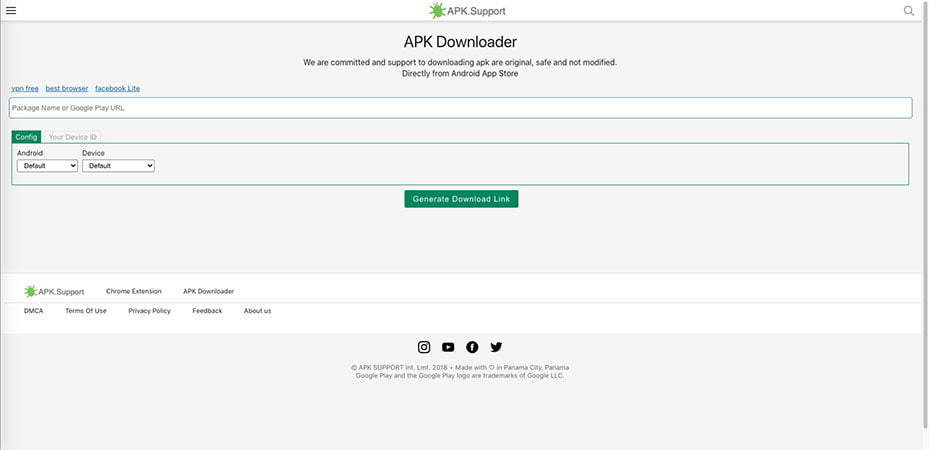
Staring off the List is a cool chrome browser extension – Direct APK Downloader that is free and gets the job done. Simply put the name of the installer package or provide a Play Store link and hit the search button, and you will get the download link for the actual apk file.
- Open the Google Chrome Browser on the App can go the Extensions
- Search APK Downloader Extension and then add to Chrome.
- An icon will be added to the right side of the address bar. Click on it to open the APK Downloader homepage.
- Use the Search Dialog Box to provide the APK name or the play store link.
- Choose the Android Version and the Device Type then press enter to generate download link.
- This will prompt the Search and once the app is found simply press download.
- Get the file to use with the PC emulator or transfer to the Smartphone.
Real APK Leecher
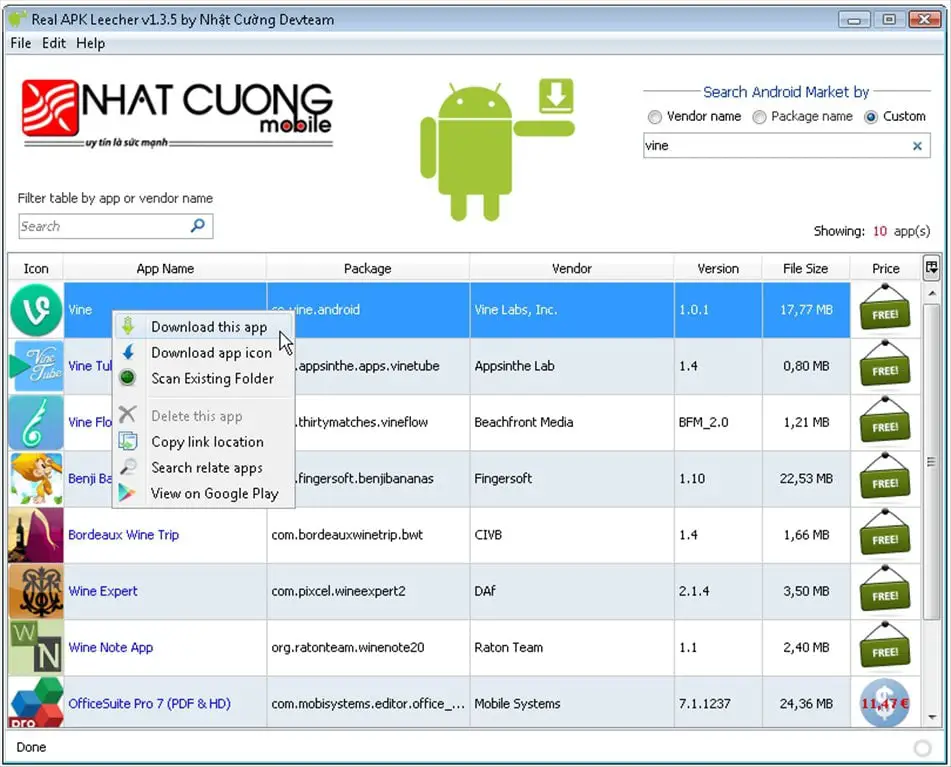
Unlike browser extensions, Real APK Leecher is a Windows tool that allows you to pull apk from Google Play Store to your PC. This is a handy tool that will enable users to come in terms of downloading area restricted apps to their smartphones or computer. The best part about this tool is that it even allows users to keep track of the version of the APK files.
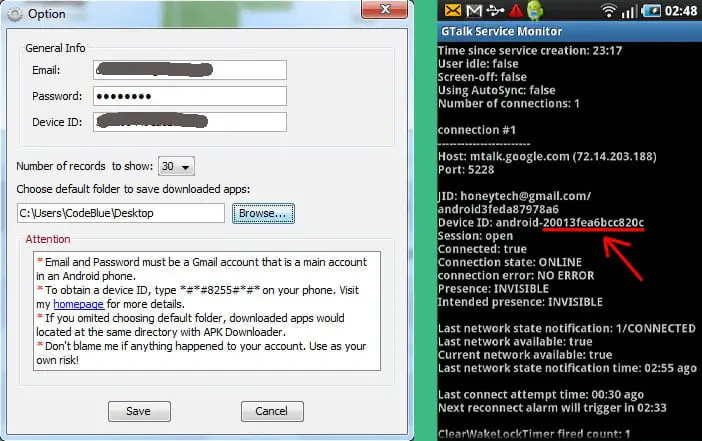
- First of all, download the .zip file of Real APK Leecher.exe and extract it on to the PC then install the program.
- At first launch, it will require the Login details of a google account with a device ID that uses the same account.
- To find out the device ID, open the dialer and enter *#*#8255#*#*.
- For some phones, you may need to install the Device ID app to obtain the information.
- Once the initial setup is done, you can open the main Window.
- Simply type the target App’s name in the search dialog box and press Search.
- The program will try to log in to the main Google Play Store account and list all the apps which match the searched term.
- (Note: In case no result is obtained then the user needs to press the Edit button and go to Options and recheck the Google Login ID and configure the app.)
- Once you see the app, simply right-click on the icon and select the option to download the apk file.
Real APK Leecher allows you to download premium apks. However, if the user does not purchase them with their Google ID, then it cannot be downloaded, resulting in an error.
apps.evozi
Apps .evozi is a website that offers a service called Online APK Downloader that allows you to download an apk file directly to your desktop and your device. It’s helpful when you are unable to get an app form Google Play that isn’t compatible with your phone or doesn’t support the snapdragon device, or the app is not available in your country.
- Simply go to the official play store Webpage search for the app you need.
- Simply copy the URL from the Address bar and head to Evozi APK Downloader page.
- Paste the Copied URL and Press “ Generate Download Link’.
BlueStacks Emulator
BlueStacks is an android emulator software that you can install on PC or MAC to run android OS and experience all the mobile apps virtually. It is one of the most popular Android Emulators that also has many parks, especially playing mobile games on your PC with external gaming controller support.
- First and foremost, download the Bluestacks at bluestacks and follow their instructions to install on your computer.
- Launch the program and configure the initial set up including sign in to with a google account.
- BlueStacks comes with Google Play Store preinstalled.
- Go to play Store app by double-clicking it, search for any App you wish to download.
- From there you can install the app like you normally do on a phone and enjoy it on your PC.
Apk sharing websites
There are quite a few third-party websites that allow developers to share their app files for testing purposes while under development or just release the app through these websites such as apkpure or apkmirrior. But beware of the shady domains and know what you are doing; otherwise, you might end up downloading malware apps and malfunctioned cracks to steal data from your phone.
Once completed, transfer the downloaded file to your device via USB, Bluetooth, or using WebSharingLite with a wi-fi network. Now install the apk file manually, enjoy!




Now I know other tools. Are they safe? I used to use extension of known sites like apkpure, apknite as I’m afraid of virus :v.
Tks. Now I know other tools. Are they safe? I used to use extension of known sites like apkpure, apknite as I’m afraid of virus :v.