Stay Connected Even Offline: Must-Have Apps for iPhone Users

In today’s digital world, staying connected is essential, but there are times when internet access isn’t available. Whether you’re traveling, commuting, or in an area with poor signal, having offline apps on your iPhone can make a huge difference. From entertainment and productivity to navigation and reading, these apps ensure you stay engaged even without Wi-Fi or mobile data.
We’ve carefully selected the best offline apps for iPhone based on their usability, features, and reliability. Whether you need offline maps, music, or note-taking tools, this list has you covered.


Roadtrippers is an essential travel companion for road trip enthusiasts, offering a seamless way to plan and navigate adventures across the USA and Canada. Whether you’re heading out in an RV, camping under the stars, or exploring new cities, this app simplifies every step of the journey. Its powerful offline functionality sets it apart, a crucial feature for travelers venturing into remote areas with limited connectivity. With the premium upgrade, users can download offline maps, ensuring they never lose access to their routes, points of interest, or campground information—even in the most off-the-grid destinations. The integration with Campendium further enhances this experience by providing detailed offline campground reviews, cell coverage overlays, and public land maps, making it an excellent choice for RVers and campers.
The app’s user-friendly interface makes it easy to map out trips with multiple stops, sync plans across devices, and access RV-friendly GPS navigation without relying on an internet connection. While the free version allows basic trip planning, offline features require a premium subscription, which some users feel is a bit pricey. Compared to other navigation apps like Google Maps or Waze, Roadtrippers stands out by focusing specifically on long road trips rather than just navigation. Its deep database of attractions and campgrounds gives it an edge over standard mapping apps, making it ideal for adventure seekers, especially for those exploring areas with weak or no signal.


MAPS.ME is another must-have offline ios app for travelers who frequently find themselves in areas with limited or no internet access. Unlike many navigation apps that require constant connectivity, MAPS.ME provides fully offline maps with turn-by-turn navigation, making it an excellent choice for road trips, hiking, and international travel. Its OpenStreetMap integration allows users to access up-to-date maps curated by millions of contributors, ensuring accuracy even in lesser-known locations, which you can get in Google Maps. Whether you’re driving, cycling, or walking, the app provides reliable navigation without draining mobile data.
Beyond navigation, it stands out with its offline search, points of interest (POIs), and curated travel guides. The ability to bookmark locations and access hiking trails makes it particularly useful for adventurers. However, while the offline maps are fast and detailed, some users report occasional inaccuracies in directions, particularly in rural areas. Additionally, background GPS usage can quickly deplete battery life, making a power bank essential for long trips.


Of course, Google Maps remains the gold standard for navigation, offering an extensive database covering over 220 countries and millions of businesses. While it’s widely known for real-time GPS navigation, traffic updates, and public transit information, its offline maps feature makes it an excellent choice for travelers venturing into areas with limited connectivity. Remember that you have to download specific regions in advance, ensuring access to turn-by-turn navigation and place searches without requiring an internet connection. This is particularly useful for road trips or international travel, where mobile data is often unreliable as soon as you arrive at the destination.
Offline functionality is somewhat limited compared to fully offline-first apps like MAPS.ME. Live traffic updates and public transit details require an active connection, and downloaded maps expire if not refreshed periodically.


Google Translate is an indispensable tool for breaking language barriers, supporting translation between 249 languages. One of its standout features is offline translation, allowing users to communicate without an internet connection. By downloading language packs in advance, travelers and professionals can translate text, speech, and even images without worrying about connectivity issues.
The offline mode ensures essential translations are always accessible, making it the perfect companion for travel to that remote island you have always dreamt of exploring in Thailand or Indonesia. While advanced features like real-time conversation translation require an internet connection, introductory text, and camera translations remain fully functional offline.

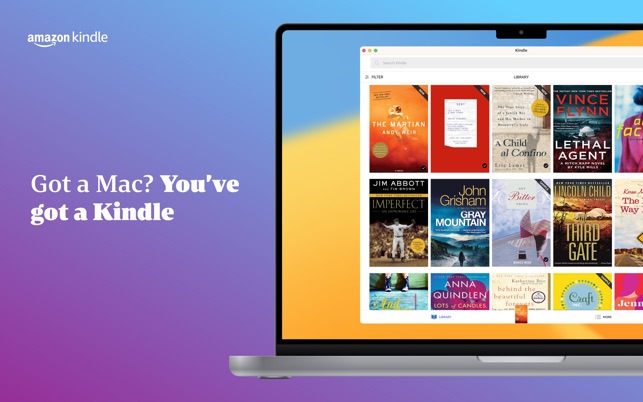

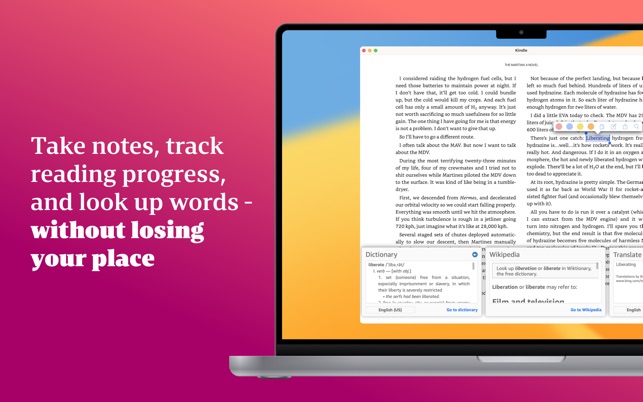
The Kindle app is the perfect companion for book lovers who want to read anytime, anywhere—even without an internet connection. With its offline reading feature, you can download Kindle books and enjoy them on long flights, during commutes, or in areas with no connectivity.
The app offers a customizable reading experience with adjustable font styles, sizes, and screen brightness, ensuring comfortable reading day or night. Features like Whispersync keep your progress synced across devices, while X-Ray and instant translations enhance comprehension. Whether you’re diving into novels, textbooks, or magazines, Kindle’s offline capability makes it a reliable reading solution wherever you go.


Pocket is your personal reading hub, letting you save articles, news, and videos from any app or website to read later—even offline. Whether you’re commuting, relaxing, or taking a break, Pocket provides a distraction-free reading experience with customizable layouts and estimated reading times.
With its Listen feature, Pocket converts articles into audio, making it easy to stay informed hands-free while cooking, commuting, or exercising. Upgrade to Pocket Premium for advanced features like full-text search, unlimited highlights, and a permanent library of saved content. Keep up with what matters most, anytime and anywhere.


Google Docs is a powerful, cloud-based document editor that lets you create, edit, and collaborate in real time. Share documents, add comments, and track changes effortlessly with built-in version history. The app supports offline mode, so you can work anywhere, anytime.
Seamlessly open and edit Microsoft Word files, search Google without leaving your doc, and use easy-to-apply templates for professional results. As part of Google Workspace, it offers enhanced features like unlimited version history, built-in chat, and cross-device syncing.


Quizlet offers excellent offline usability, allowing you to download your flashcard sets and study materials for access when you don’t have an internet connection. You can create custom flashcards, access pre-made decks, and even practice with them without needing to be online. Whether you’re traveling or in an area with limited connectivity, Quizlet ensures you can continue your studies uninterrupted. Plus, it syncs your progress across devices, so when you reconnect, your data will automatically update. This makes it a convenient tool for learning on the go, even without constant internet access.


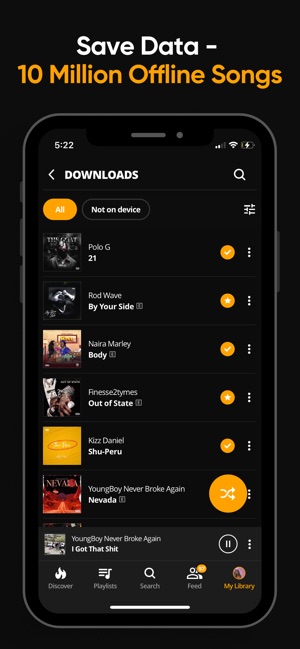

While other music streaming services like Spotify require a paid subscription to access offline listening, Audiomack stands out by offering this feature completely for free. You can download songs and albums for offline listening without the need for a subscription, which is a major benefit for users who want access to music anytime, anywhere, without incurring additional costs.
Audiomack makes it easy to enjoy a diverse range of music genres offline, making it an excellent choice for music lovers on a budget. It is one of the best music downloader apps for iPhone.




Pocket Casts truly excels in allowing users to enjoy podcasts anytime, anywhere with its offline feature. Pocket Casts automatically downloads episodes to play offline later without an active internet connection. This is especially beneficial for users who prefer to listen during commutes while traveling or in areas with spotty internet access.
Whether you’re looking for curated content or a more personalized podcast journey, Pocket Casts not only delivers offline accessibility but also features a well-rounded user experience that enhances how you engage with audio content.
With these offline apps, you can stay productive, entertained, and organized no matter where you are. Whether you need to access maps, listen to music, or take notes without an internet connection, these apps ensure a seamless experience. Which offline app do you rely on the most? Let us know in the comments!