Top Music Production Apps for iPad and iPhone: Create Anywhere!

Creating music has never been more accessible, thanks to powerful apps that transform your iPhone or iPad into a fully functional studio. Whether you’re an aspiring musician, a beat producer, or someone who enjoys experimenting with sounds, these apps provide the tools to craft professional-quality tracks. From intuitive digital audio workstations (DAWs) to feature-packed synthesizers and beat makers, we’ve selected the best options based on usability, features, and user feedback.


GarageBand is Apple’s premier music production app, transforming your iPhone or iPad into a powerful recording studio. Designed for both beginners and experienced musicians, it features an intuitive Multi-Touch interface that makes playing virtual instruments—like keyboards, guitars, and drums—effortless. The Live Loops feature allows users to create beats and remix tracks in a DJ-style workflow, while the Sound Library offers an extensive collection of loops, effects, and virtual instruments. Although GarageBand is Free accross al platforms, additional instrument packs can be purchased for $4.99 each, expanding the creative possibilities. Users can also record live instruments using built-in amps and stompbox effects, making GarageBand a versatile tool for music creation on the go.
Despite its impressive capabilities, GarageBand has some limitations compared to full-fledged desktop digital audio workstations (DAWs). While you can still mix and master your songs within the app, its track limit is capped at 32, significantly lower than the Mac version’s 256 tracks. The app also lacks advanced MIDI export options, and users have reported frustration with limited time signature choices—such as the inability to properly work in 5/4 time. Additionally, iOS users miss out on a wider selection of internal sounds and external VST options available on macOS. However, for a free mobile DAW, GarageBand remains unmatched in accessibility and ease of use. If you’re looking for more advanced features, FL Studio Mobile or Cubasis might be worth considering, but for iOS users wanting a seamless and professional music-making experience, GarageBand is still one of the best options available.


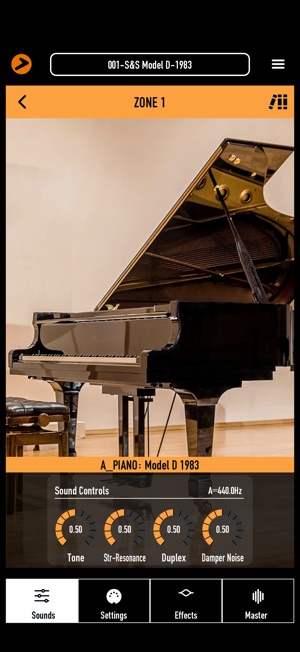

The app store has a ton of hidden gems in it too for making music on iOS devices. Numa Player is one of the best free virtual instruments available on iOS, and with its massive 2.0 update, it has become even more powerful. This update introduces multi-core support, significantly improving DSP performance, along with various UI enhancements that make the app more intuitive and efficient.
The interface is structured into four parts, allowing users to assign instruments, customize keyboard ranges, and fine-tune multiple settings. With four expansive sound libraries, the app offers a diverse selection of high-quality instruments, including standout electric pianos and keys. Each instrument can be further enhanced using nine built-in effects per part and a master effects section for refining the final output.
Numa Player particularly shines when combining sounds, either manually or by exploring the included preset banks, resulting in rich, professional-grade instrument layers. As an AUv3 instrument, it integrates smoothly with GarageBand and Logic Pro for iPad, making it an excellent addition to any mobile music production setup. For a completely free app, Numa Player delivers an outstanding experience, making it an easy recommendation for musicians and producers looking for high-quality virtual instruments.


BandLab is a powerful all-in-one music creation platform that makes it easy for anyone to create, record, and share music. Whether you’re a beginner or an experienced musician, BandLab offers a fully equipped Digital Audio Workstation (DAW) right on your mobile device.
With its 16-track Studio, you can record, edit, and mix music on the go. The app provides over 330 Virtual MIDI instruments, 300+ vocal/guitar/bass audio presets, and a vast library of royalty-free loops and samplers to help bring your music to life. Built-in tools like AutoPitch, Metronome, and Tuner make it even easier to perfect your sound.
BandLab also serves as a thriving social music platform, connecting you with other musicians for collaboration and discovery. Whether you’re remixing tracks, mastering your songs, or distributing music to major platforms, BandLab gives you everything you need to take your music to the next level—all for free.


Beat Maker Pro is the ultimate rhythm-training and beat-making app for beginners and advanced musicians alike. With guided lessons, intuitive drum pads, and skill-building exercises, it helps users master beat composition step by step.
The app features over 1,000 lessons and unique sound packs, covering EDM, trap, house, pop, and more. Users can practice finger drumming with drums, piano, and FX, or challenge themselves in career mode to earn Superstar status. Regularly updated sample packs from professional beat-makers keep creativity flowing.
Premium users get access to exclusive sound packs, ad-free experiences, and all future premium features. Whether you’re learning the basics or honing your skills, Beat Maker Pro is the perfect music coach to bring your beats to life!



Powerful Music Production on the Go
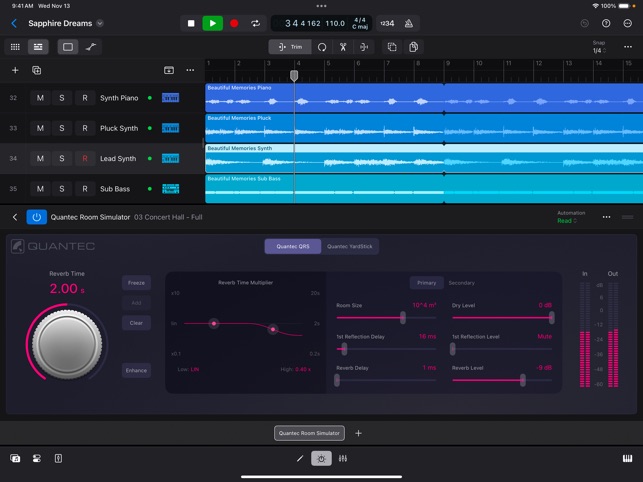
Apple’s Logic Pro for iPad brings professional-grade music production to a more portable, intuitive platform. The first thing that stands out is the simplicity of setup. Unlike traditional setups that require a bulky MIDI keyboard, a powerful Mac, and a room full of plugins, Logic Pro for iPad offers an all-in-one experience that fits comfortably on your tablet. The app brings all the tools you need, from Live Loops to traditional timeline views and mixing interfaces, but it also offers a completely redesigned interface that’s intuitive for touchscreen use.
There are pre-set templates for various genres, helping you dive right into a project, or you can create a blank session to start from scratch. The sound packs are an impressive addition, featuring loops and samples from well-known producers, and they’re all free to use. The app provides easy setup and accessibility, with Live Loops, traditional timeline views, and a redesigned interface that simplifies complex tasks. Sound packs and MIDI functionality make it a great tool for producing music on the fly, and the free 30-day trial gives users a chance to test it before committing to the $4.99/month or $49/year subscription.
While the app is feature-rich, latency issues with wireless headphones can affect real-time performance. A wired pair of headphones or a USB-C to 3.5mm dongle can resolve this issue. The touch interface allows for easy control with Apple Pencil and fingers, although some users may find the stacked layout takes time to master. The app is optimized for the Apple Pencil and finger interaction, which is a huge bonus for tactile control in music production. However, one adjustment for many users will be how everything is stacked in the interface. For example, if you want to edit a loop, you have to tap the pencil icon, and then it opens in the piano roll, which overlays the Live Loops interface. While this approach can feel cluttered initially, it becomes intuitive with practice. Arguably, this is one of the best iPad music production apps.


Portable Audio Editing Power
SoundLab brings professional-grade audio editing to your mobile device, offering an intuitive and feature-packed experience for both beginners and seasoned audio creators. This app provides a 16-track editor, over 20 audio effects, and supports lossless output formats, making it a great option for quick edits or detailed work on the go. One of its standout features is the AI Vocal Separator, which uses machine learning to isolate vocals and instrumental stems, all done locally on your device without the need for uploads. For those who need to capture audio quickly, the Audio Recorder offers customizable settings such as sample rate and bitrate, while the Recording Studio adds advanced features like in-ear monitoring and anti-popping support.
SoundLab also includes a Video Composer for syncing audio with video, ideal for creating soundtrack videos. Whether you’re editing music, podcasts, or creating content, it strikes a balance between functionality and ease of use. While it can’t replace a full desktop DAW, it’s a reliable, mobile solution for spontaneous audio production. With a range of editing and mixing options, including an exclusive dither algorithm to prevent clicks, SoundLab is an excellent choice for music lovers, podcasters, and students alike. However, unlocking all features requires a SoundLab Pro subscription, which offers ad-free use and advanced options.


Easy-to-Use Analog Chorus with Stunning Visuals
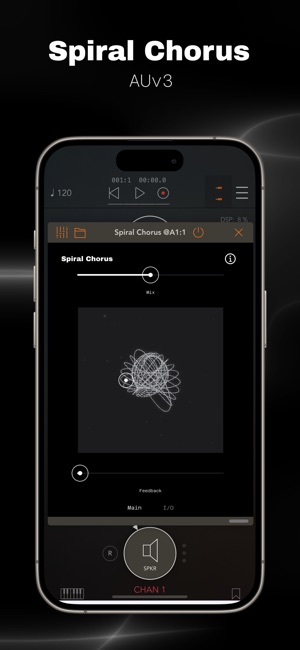
Spiral Chorus from Wild Surmise Music is a standout AUv3 plugin that offers a simple, intuitive way to add analog-modeled LCR chorus effects to your music on iOS. Perfect for iPhone and iPad users, it features a user-friendly interface tailored for touch controls. The main screen includes a mix slider and XY pad that allow you to adjust the chorus rate and depth with ease, giving you precise control over your sound. Whether you’re looking for subtle modulation or intense feedback effects, Spiral Chorus delivers a wide range of possibilities. The feedback slider further enhances customization, allowing you to push your sound into wild, experimental territory.
One of its coolest features is the 3D visualizer, which provides real-time feedback of your changes, making the editing process even more engaging. It’s ideal for musicians who want to experiment and add depth to their tracks, whether they’re working on dreamy soundscapes or edgy beats. The app is also easy to integrate with any iOS DAW (such as GarageBand or Logic Pro for iPad), fitting seamlessly into your workflow. For a high-quality, intuitive chorus effect with an immersive design, Spiral Chorus is a fantastic choice for both beginners and experienced producers. Plus, its affordable price makes it hard to beat.


Simple Yet Powerful Music Production
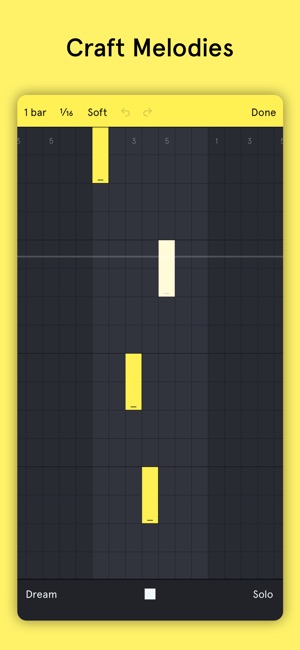
Auxy Studio is a dynamic and user-friendly music production app that lets you easily bring your musical ideas to life. Designed for both beginners and experienced producers, it simplifies the process of modern beat making and electronic music without sacrificing depth. With Auxy, you can quickly craft melodies and drum patterns by drawing notes, making it an excellent tool for anyone looking to sketch or produce full tracks. What sets Auxy apart is its vast library of high-quality instruments and drum hits, allowing you to explore a wide range of sounds. You can also import your own samples to customize kits and create unique melodies. The app comes with powerful studio-grade effects such as reverb, delay, and distortion, giving you full control to shape your sound. Plus, automation tools add movement and energy to your tracks, bringing your ideas to life in exciting ways.
When you’re ready to share your creations, you can export high-quality audio or upload directly to SoundCloud. For more flexibility, you can export stems or project files for use in major DAWs like Ableton Live, Bitwig Studio, and Studio One. If you’re after a straightforward yet feature-rich music creation tool, Auxy is definitely worth a try.


A Delightfully Bizarre Delay Effect
Moon Echo is an unconventional and captivating delay plugin that uses a communications technique, reflecting radio waves off the moon’s surface. The result? A truly unique and quirky echo effect that offers both creative and functional uses. Developed in collaboration with Berlin-based musician Hainbach, Moon Echo invites users to explore space-inspired sonic landscapes that range from subtle to mind-bending. The process behind the creation of this app is as fascinating as its sound. Hainbach sent test signals from human voices and tones, even incorporating support from his Patreon community, all directed toward the moon to capture its unpredictable reflections. This gives Moon Echo its distinctive “lunar” character, which creates artifacts unlike anything you’ve experienced in traditional delay effects.
Whether you’re using it for simple, character-rich delays or diving into more experimental sound design, Moon Echo delivers. The controls allow for the creation of epic drone soundscapes and strange, evolving textures, especially when paired with the Doppler shift and feedback adjustments. You can create wild, cinematic soundscapes that feel out of this world. Available as an AUv3 plugin and standalone app, Moon Echo stands out as an incredibly fun and educational tool for musicians, offering both a playful lo-fi effect and a unique perspective on space and radio wave communication. If you’re looking for a truly original free iOS music making app, Moon Echo is a must-try.



A Pro DJ in Your Pocket
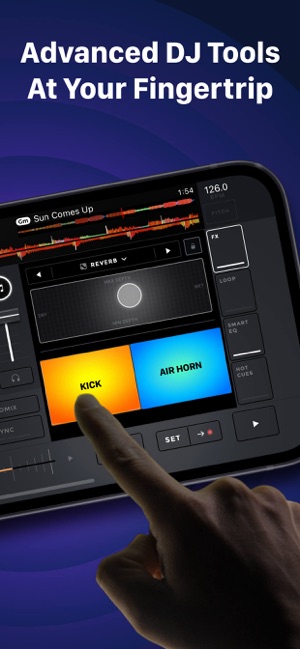
Edjing Mix transforms your phone or tablet into a powerful DJ tool, providing a professional turntable interface for creating mashups, remixes, and live mixes. With access to over 70 million tracks from platforms like Beatport, SoundCloud Go+, iTunes, and others, you can seamlessly search and sort through your music library to find the perfect tracks. The app features automatic BPM detection, manual BPM adjustment, and advanced audio effects such as Echo, Flanger, and Reverb. It also provides a wide audio spectrum for optimized beat detection, plus additional effects available for purchase to enhance your mix.
For those who want to take their skills further, Edjing Mix includes an integrated DJ school, offering lessons and exercises from DJ Carlo Atendido, perfect for beginners or anyone looking to improve their DJing abilities. The app supports hardware integration, working with MIDI controllers like the DDJ-200 and time-coded vinyls for a more hands-on experience. You can also pre-cue stereo with headphones, although this feature requires an in-app purchase. If you’re looking to record your mixes, Edjing Mix allows you to capture them in high-definition (.aiff format), and it even supports automatic mix transitions with the Automix feature. For on-the-go control, the app also integrates with the Apple Watch, letting you manage your BPM and DJ effects directly from your wrist.


The Free iOS Synth That Sounds Amazing
AudioKit Synth One is an open-source, professional iOS synthesizer that has been making waves in the music world for its powerful features and stunning sound. This app is completely free, with no ads, in-app purchases, or limitations. Packed with over 300 presets from world-class sound designers behind artists like M83, Rihanna, and Tycho, the app delivers a range of features that cater to both beginners and advanced users. It includes a hybrid analog/FM poly synthesizer with five oscillators, vintage-inspired filters, a 16-step sequencer, and expressive arpeggiators. You can shape your sound using touchable ADSR envelopes and enjoy the flexibility of a FM oscillator with modulation options.
It is not just a simple synth; Synth One is also built to integrate with other music tools. It supports Audiobus 3, Inter-app Audio (IAA), Ableton Link, and MIDI, allowing you to use it with external controllers or sync it with other music apps. The app also has beautiful effects, including a 4-pole vintage low-pass filter, a high-pass/band-pass filter, a warm Costello reverb, and a multi-tap delay. Whether you’re crafting lush pads, deep basslines, or experimental sounds, AudioKit Synth One offers endless possibilities. AudioKit Synth One is a must-have for any musician or producer using iOS, offering pro-level tools completely for free.
Pick the Right Music App for Your Style
Whether you need an advanced DAW like GarageBand or a simple loop-based sequencer, there’s an app to match your creative workflow. These music-making apps ensure that inspiration never slips away, no matter where you are. Which one is your favorite? Let us know in the comments below!